Product
Care Minder creates services that consider patients, nurses, and hospitals.

Even before the nurse's visit to your room, you can communicate
CareVoice Smart Bed
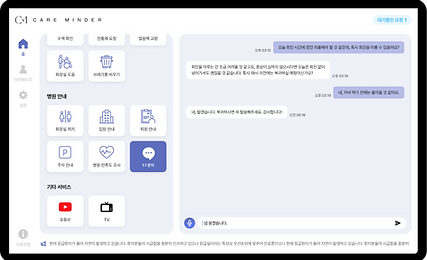
CareMinder can relay patient questions and requests to the nurse through a tablet attached to the bed. There is no need to stop a passing nurse or go to them directly to ask questions or ask for what you need.
On the home screen, patients can view their own treatment status or the hospital's introduction, depending on the nurse's settings.
Patients can check the current congestion level of the hospital through the ‘Currently accumulated requests’ displayed on the main screen or the hospital’s ‘Notices’.


Request by voice
CareMinder uses voice recognition function. It is convenient for the elderly who are awkward in using digital devices or patients who have difficulty typing. The input is first purified to ensure that it is a request based on the correct voice. CareMinder recognize if patients pressed the record button by mistake or if they said something but forgot press the complete button and automatically handles it.
CareMinder uses voice recognition function. It is convenient for the elderly who are awkward in using digital devices or patients who have difficulty typing. The input is first purified to ensure that it is a request based on the correct voice. CareMinder recognize if patients pressed the record button by mistake or if they said something but forgot press the complete button and automatically handles it.

CareMinder uses voice recognition function. It is convenient for the elderly who are awkward in using digital devices or patients who have difficulty typing. The input is first purified to ensure that it is a request based on the correct voice. CareMinder recognize if patients pressed the record button by mistake or if they said something but forgot press the complete button and automatically handles it.

Message the nurse
Nurses can send messages to patients.
Nurses can also get additional information about their needs or contact the patient directly if it is related to providing information. Even if the nurse don't go , you can still resolve it through message communication.
Messages sent by nurses automatically pop up and appear as notifications on the patient's screen, creating seamless communication.



Creating an environment where
you can focus on your original work
CareVoice Groupware
Care Minder organizes the communication and work distribution system
between patients and nursing staff.
Automatically distributes patient requests and questions to the appropriate personnel and supports convenient, non-face-to-face, two-way communication with patients.

Automatically categorized by task
Efficient patient request triage

Without having to go directly to the patient Easy messaging to communicate
“CareVoice Groupware” supports the following functions:
From the currently supported linking and provisioning functions to the functions planned to be supported in the future
Here is a brief explanation of each function.
Patient Notes
Things to remember and note about the patient
Record and share additional information.
Write a hospital notice
You can write hospital announcements that will automatically repeat on the patient page.
statistics
Information for each patient and nursing staff
You can get statistics about the system.